
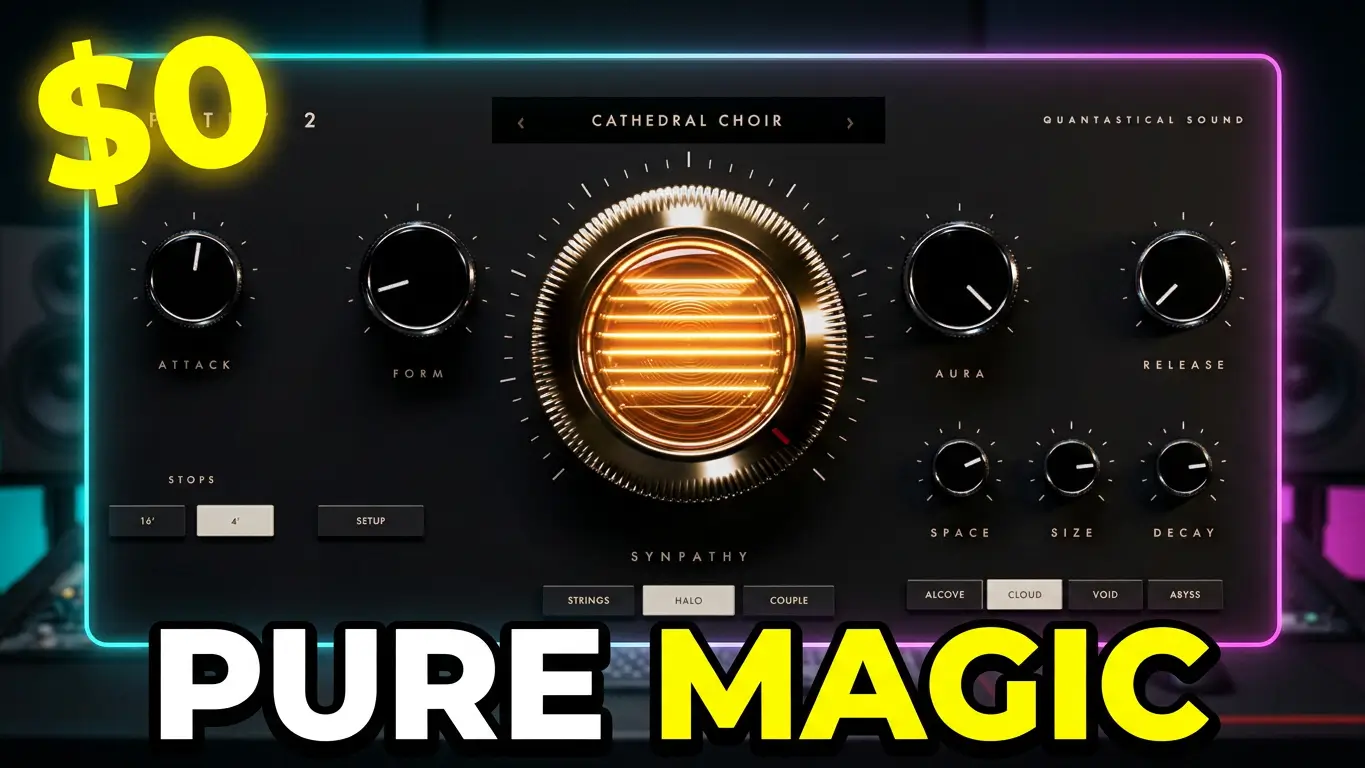
If you’re looking for a free synth plugin that does something a little different, Synpathy from Quantastical Sound is worth checking out. This free sympathetic string machine creates evolving, resonant sounds that can add movement, depth, and atmosphere to your music productions.
Unlike a conventional synthesizer that generates a sound and leaves it relatively static, Synpathy focuses on the interaction between string-like voices. The result is a sound that can bloom and evolve as you hold chords, making it an interesting instrument for ambient music, cinematic sound design, electronic music, and atmospheric textures.
Watch the Synpathy Demo
In this video, I take a look at Synpathy and explore what this free instrument has to offer. Rather than relying on a long feature list, the best way to understand an instrument like this is to hear how it responds when you play it.
What Is Synpathy?
Synpathy is a free virtual instrument developed by Quantastical Sound. It’s designed around the concept of sympathetic resonance, where interacting voices help shape the overall sound.
This approach produces string-like tones that can develop and change over time. Depending on your settings and playing style, you can explore thin, glassy sounds, wider choral textures, resonant chords, and expansive atmospheric layers.
It’s not intended to replace an all-purpose synthesizer. Instead, Synpathy offers a more specialized sound that could be useful when you want something different from the usual collection of synth pads and string patches.
Synpathy’s Main Controls
Synpathy keeps its primary sound-shaping controls focused on three main parameters.
- FORM: Changes the character of the string sounds, from thinner, glassier tones to wider, more choral textures.
- AURA: Shapes the surrounding space, ranging from more intimate sounds to expansive, atmospheric results.
- SYNPATHY: Adjusts the interaction between voices, influencing how the sound resonates and evolves.
Additional controls include Attack, Release, Space, Size, and Decay, giving you further options for shaping the instrument’s response and overall character.
Synpathy also includes 16 hand-tuned presets that you can access using the arrow keys. Per-voice humanization adds subtle variations to help keep repeated chords from sounding completely identical.
What Can You Use Synpathy For?
Because Synpathy emphasizes sustained, evolving sounds, it could be useful in several music-production situations.
Ambient music: Create sustained chords and atmospheric layers that gradually change character.
Cinematic compositions: Add resonant textures beneath a soundtrack or build tension with evolving harmonies.
Electronic music: Use the instrument for unusual synth-string parts, pads, and layers that complement more conventional synthesizers.
Sound design: Explore the interaction between notes to create textures that are less predictable than a standard static patch.
Song production: Add a contrasting layer to a chorus, bridge, or instrumental section when a conventional keyboard sound isn’t quite right.
As with any instrument, the results depend on how you play it and how you shape the sound. Synpathy’s particular strength is its focus on resonance and movement rather than trying to cover every possible synthesizer sound.
Is Synpathy Compatible With Your DAW?
Synpathy version 2.0 is available for macOS and Windows. Supported formats include AU, VST3, and AAX, along with a standalone application.
The developer lists macOS 10.13 High Sierra or newer, including Intel and Apple Silicon Macs, and Windows 10 or newer in 64-bit format.
The available formats make it worth investigating if you work in Logic Pro, Ableton Live, Cubase, Studio One, Pro Tools, or another compatible music-production environment. Check the developer’s current download information for the requirements and format that apply to your system.
Download Synpathy for Free
Synpathy is available free from Quantastical Sound, with no license or activation required according to the developer.
Official website and download: https://quantasticalsound.com/synpathy.html
If you’re interested in trying a different approach to synth strings, sympathetic resonance, and evolving textures, Synpathy is worth a look. It’s a specialized instrument rather than an all-purpose synthesizer, and that may be exactly what makes it interesting.
Synpathy is developed by Quantastical Sound. Check the official website for the latest version, compatibility details, and download information.
Leave a Reply