
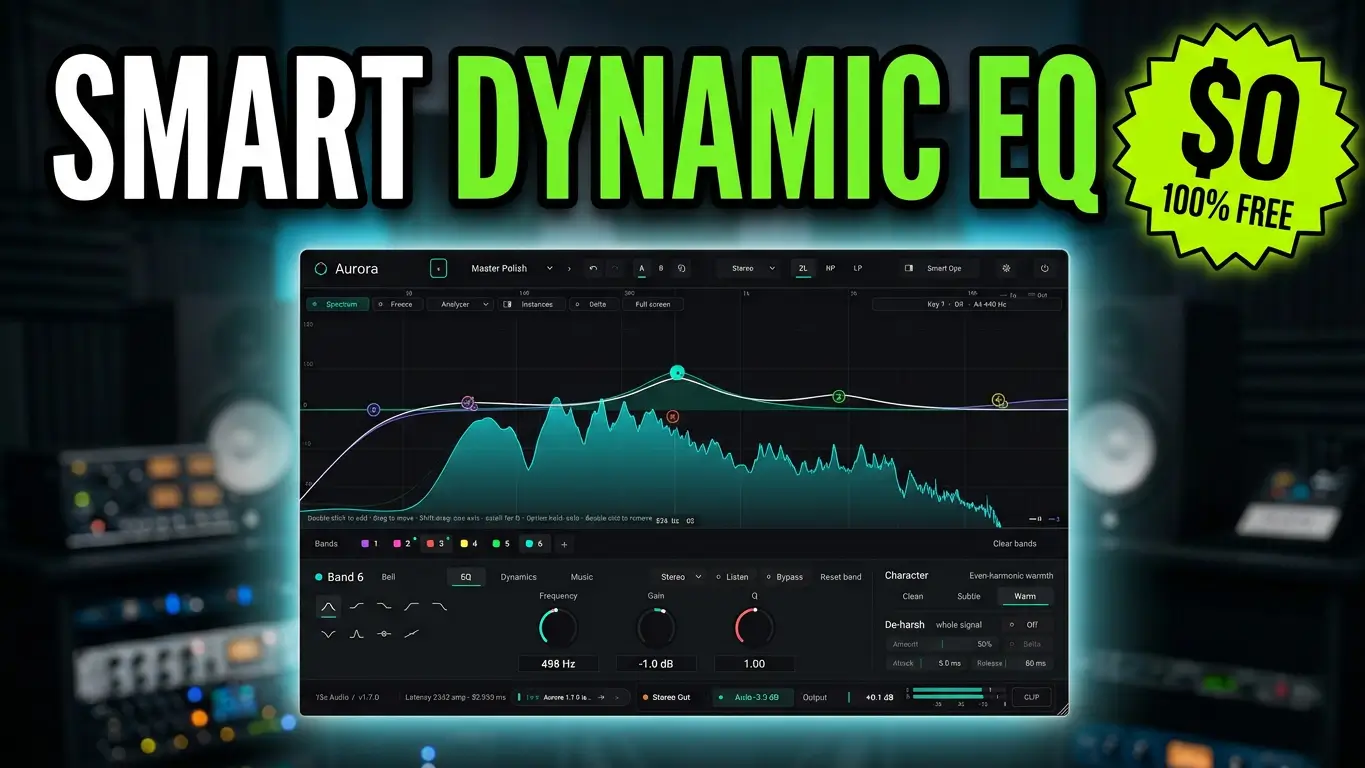
Aurora by 13X Audio is a free dynamic EQ plugin that combines traditional parametric equalization with advanced processing tools, musical note tracking, resonance control, and more. Version 1.7 introduces several interesting features that make this plugin worth exploring, including EQ bands that can follow musical notes, chords, bass lines, and other elements of your mix.
If you’re looking for a free alternative to expensive EQ plugins like FabFilter Pro-Q 4, Aurora is worth checking out.
Watch the Aurora Plugin Overview
Here’s a look at Aurora by 13X Audio, including its dynamic EQ capabilities, Smart Ops tools, musical processing features, and built-in de-harshing processor.
Parametric EQ With Up to 24 Bands
Aurora includes a parametric EQ with a real-time spectrum analyzer and support for up to 24 EQ bands. You can adjust frequency, gain, and Q directly on the spectrum display, with eight different filter shapes available.
The plugin also includes three phase modes: Zero Latency, Natural Phase, and Linear Phase. Stereo, mid-side, and left-right processing provide additional flexibility when working on individual tracks or a complete mix.
Dynamic EQ Processing
Any individual EQ band can be converted into a dynamic band. This allows the equalizer to respond to changes in the audio rather than applying a permanent boost or cut.
You can adjust threshold, ratio, attack, release, and range to control how each band responds. This is useful for managing problematic frequencies that only become noticeable at certain moments in a performance.
Smart Ops Automated Processing Tools
One of Aurora’s more interesting features is Smart Ops, which provides several automated processing tools directly inside the equalizer.
- Reference Spectrum Matching: Compare and match the frequency balance of another audio source.
- De-resonate: Identify and reduce problematic resonant frequencies.
- De-ess: Help control excessive sibilance.
- Automatic Filtering: Apply high-pass and low-pass filtering.
- Unmask: Help separate competing tracks by addressing frequency conflicts.
Rather than automatically committing changes without input, Aurora lets you preview suggested EQ adjustments on the graph before applying them. The resulting EQ bands remain editable.
Musical EQ Features in Aurora 1.7
The version 1.7 update introduces several features that allow EQ adjustments to follow musical information.
Click to Follow allows you to right-click a sound on the spectrum and have an EQ band follow it.
Chroma EQ lets you boost or cut a particular musical note across multiple octaves.
Out-of-Key Cleaner dynamically addresses resonances outside the song’s key while leaving notes within the key untouched.
There are also tools specifically designed for low-frequency processing.
- Per-Note Leveler: Helps even out the perceived volume of individual bass notes.
- Kick-Bass Lock: Allows the bass to duck around the kick drum’s frequency when the kick hits.
- Microtonal Tuning: Provides additional options for working with non-standard musical tuning.
- Musical Lookahead: Synchronizes EQ changes with the musical beat.
Additional Features: De-Harshing, Delta Mode and More
Aurora also includes A/B comparison, undo and redo, automatic gain compensation, and Delta monitoring, which lets you hear exactly what the EQ is changing.
You can manage multiple Aurora instances in one window and compare their EQ curves. There’s also a built-in de-harshing processor with clean, subtle, warm, and harmonic coloration options.
A Free Alternative to FabFilter Pro-Q 4?
For anyone comparing EQ plugins, Aurora is an interesting addition to the free plugin category. It combines parametric EQ, dynamic processing, spectrum analysis, resonance control, and musical EQ features in one package.
It isn’t necessarily a direct replacement for established commercial tools like FabFilter Pro-Q 4, but it offers a different approach to equalization and includes several features worth experimenting with.
Download Aurora by 13X Audio
Aurora is available for Windows, macOS, and Linux, with VST3, CLAP, AU, and LV2 support depending on the operating system.
No account, activation, or license key is required, and the plugin can also operate offline.
Download Aurora for FREE: 13X Audio Official Website
If you’re looking for a free dynamic EQ plugin or a new alternative to explore alongside your existing mixing tools, Aurora is worth adding to your collection.
Leave a Reply