What if virtual orchestral instruments did not have to rely entirely on massive traditional sample libraries?
That is the idea behind Instrument X from Dreamtonics, a new virtual instrument platform that uses neural acoustics modeling to turn MIDI and notation into expressive instrumental performances.
I recently took a quick first look at Instrument X. I am still getting familiar with the software and do not do a large amount of orchestration myself, so this is not intended as a full review. Instead, this is an early look at how the program works and some of the features that immediately stood out to me.
Related; Can SOLARIA 2 Rap in Synthesizer V Studio Pro 2? The Results Might Surprise You!
From the Company Behind Synthesizer V
If the interface looks familiar, there is a good reason for that.
Dreamtonics is also the company behind Synthesizer V, the vocal synthesis software I have been using for quite some time. Instrument X has a similar general workflow and interface, which made it easier for me to start understanding the basics.
While Synthesizer V focuses on vocals, Instrument X is designed for instrumental performances, including strings, woodwinds, and brass.
The software includes a range of instrument expressions and focuses on creating performances from the musical information you provide rather than simply triggering a collection of static recordings.
What Is Neural Acoustics Modeling?
Traditional orchestral sample libraries generally work by recording musicians playing individual notes and articulations. The software then plays back and combines those recordings based on the MIDI information you enter.
Instrument X takes a different approach through what Dreamtonics calls neural acoustics modeling.
The goal is to transform MIDI and notation into expressive performances with controls for articulation, dynamics, variations, and other aspects of the performance.
This does not necessarily mean traditional sample libraries are going away. There are many excellent orchestral libraries available, and each approach has its own strengths.
But Instrument X represents an interesting alternative, particularly because of how directly you can edit the performance.
Editing Notes and Articulations
One of the first things I explored was a clarinet.
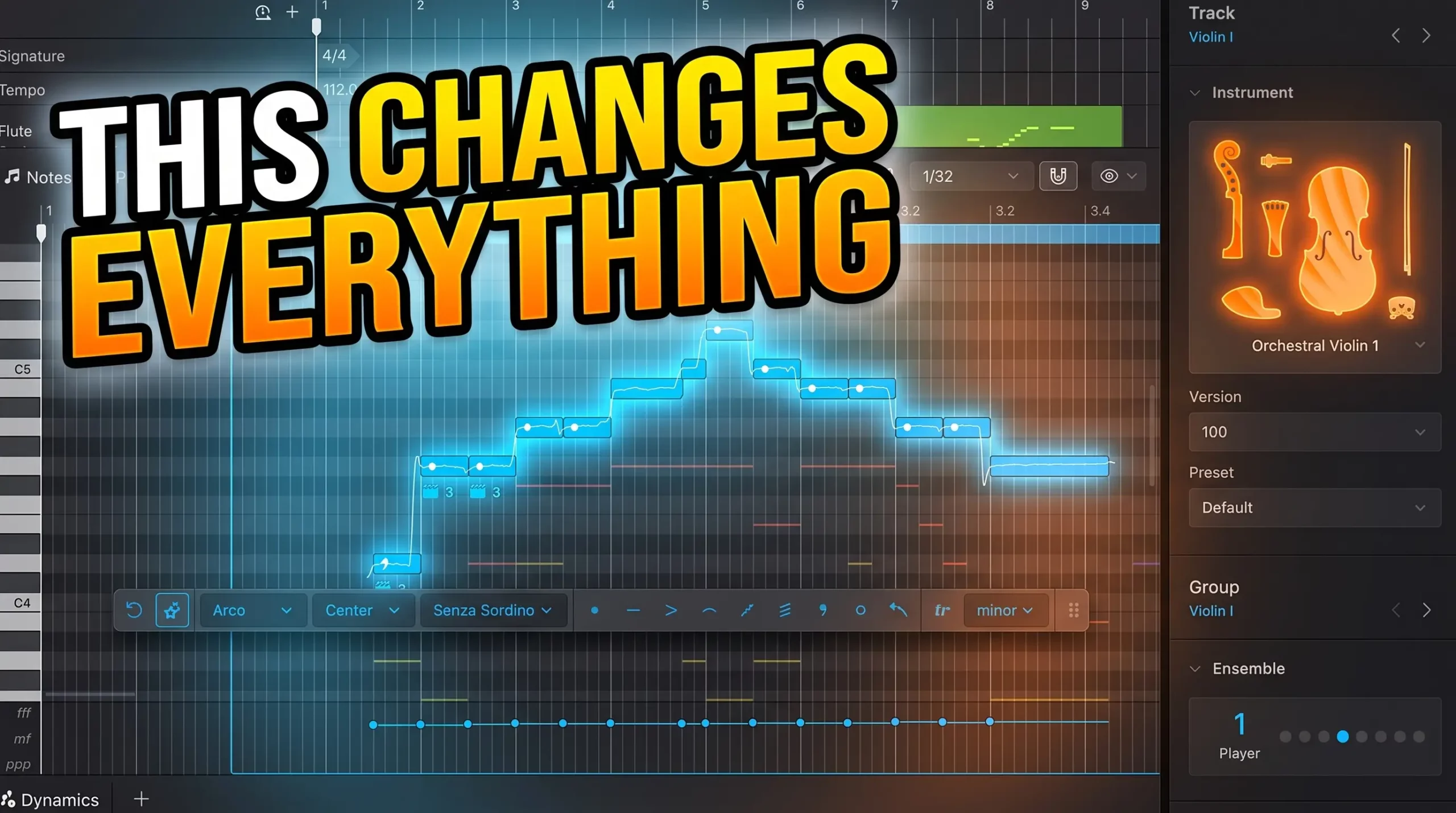
The MIDI notes are displayed directly within the interface, allowing you to quickly make changes to the musical performance. You can move notes around, change their length, and experiment with different techniques.
For example, I experimented with adding a trill, removing it, applying accents, and making notes more staccato.
The articulation workflow is one of the areas that immediately stood out to me. Instrument X can handle articulations automatically, but it also gives you more detailed control when you want to make specific changes.
This makes the workflow feel closer to editing a performance rather than simply selecting different patches from a large sample library.
Dynamics and Performance Variations
Instrument X also includes a dynamics lane that can change the character of the performance.
There are also AI-powered performance retakes designed to create variations. This could be useful when you want to explore different interpretations of the same musical passage rather than manually rebuilding every part from scratch.
As with any expressive virtual instrument, the real question is how these controls respond in an actual production. My video only provides a quick first look, but the editing options suggest there is considerably more to explore.
Creating Ensembles
Another feature I demonstrated was the ability to work with groups and ensembles.
Starting with a single clarinet, I could increase the number of instruments playing together. I experimented with larger groups, including an ensemble of multiple clarinets.
This gives you another way to shape the scale of a performance without necessarily having to build every layer as a completely separate track.
There are also numerous parameters available for adjusting how the instruments perform.
Switching Instruments
One particularly convenient part of the workflow is the ability to change instruments.
After working with the clarinet, I switched the performance over to a French horn and continued editing the notes and articulations.
Being able to experiment with different instruments using the same basic musical material can be useful when arranging. You may write an idea for one instrument and later decide that another instrument fits the arrangement better.
Microphones, Effects, and Mixing
Instrument X also includes controls for effects, mixing, and microphone placement.
During the demonstration, I looked at different microphone and studio options, including Studio A and Studio B.
These controls allow you to shape the soundstage and experiment with the overall presentation of the instruments.
The ability to adjust microphone placement and mixing is particularly important for orchestral productions, where the sense of space can have a major effect on the final result.
A 14-Day Trial Is Available
For this video, I was using the demo version of Instrument X.
Dreamtonics offers different purchasing options, including instrument packages and a larger bundle, and there is also a 14-day trial available for people who want to explore the software before making a decision.
Because I had only recently downloaded Instrument X when making the video, this was very much an initial hands-on look rather than a long-term evaluation.
Could Instrument X Expand Beyond Orchestral Instruments?
One thing I found myself wondering about is the name: Instrument X.
I have no inside information about Dreamtonics’ future plans, so this is purely speculation. But because the name is not specifically tied to orchestral instruments, it made me wonder whether the platform could eventually expand into other types of instruments.
Could we eventually see something like bass guitar or electric guitar?
Again, that is only speculation on my part. But it will be interesting to see how the platform develops over time.
My First Impression
Instrument X is doing something different from the traditional orchestral sample library workflow.
The combination of MIDI editing, articulation controls, dynamics, performance variations, ensembles, instrument switching, and microphone mixing gives users a different way to approach virtual instrumental performances.
I am still learning the software myself, and there is much more to explore than I covered in this short video. But because I was already familiar with Synthesizer V, I was able to quickly recognize some similarities in the workflow.
Whether Instrument X can eventually change the way producers and composers think about virtual orchestral instruments remains to be seen.
For now, it is an interesting new option for anyone who wants to explore a different approach to creating expressive strings, woodwinds, and brass performances.
Want to check out Instrument X from Dreamtonics?
You can find more information and try it for yourself here
Affiliate Disclosure: Links to Plugin Boutique are affiliate links. I may earn a commission if you make a purchase through these links, at no additional cost to you.
Watch the Video
The video at the top of this post shows my first hands-on look at Instrument X, including the clarinet and French horn demonstrations, articulation editing, ensemble controls, and microphone and mixing options.