
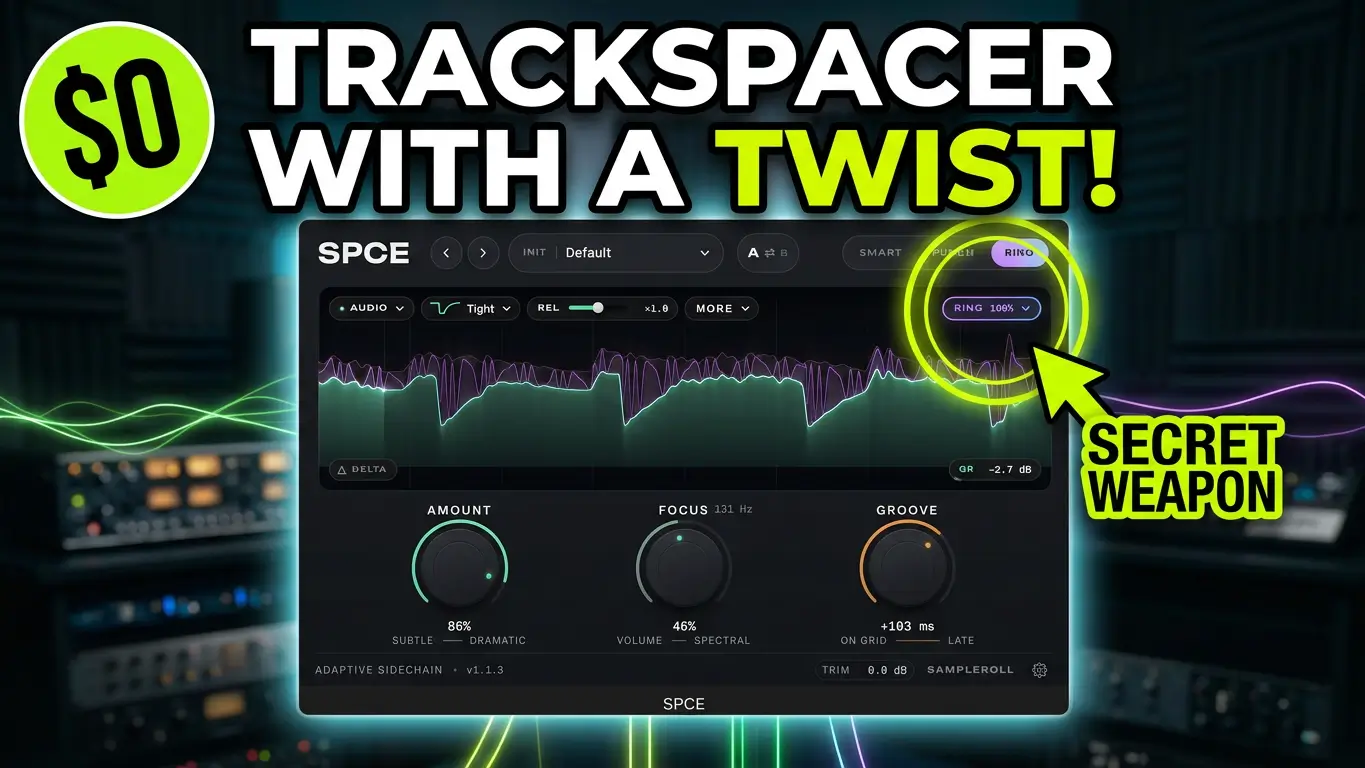
If you’re looking for a free TrackSpacer alternative, SPCE by Sample Roll is worth checking out. This adaptive sidechain plugin is designed to create space between kick drums and bass, but it also includes a few creative features that make it more than just another ducking tool.
The plugin is currently available as a free download for a limited time. There’s no announced end date for the offer, so it’s worth checking out while it’s available.
Watch the Video
What Is SPCE?
SPCE is an adaptive sidechain plugin that helps manage frequency conflicts between instruments, particularly kick drums and bass.
Traditional sidechain compression typically reduces the overall volume of the bass whenever the kick hits. Frequency-dependent processing takes a different approach by targeting specific frequency ranges instead.
SPCE uses adaptive processing to identify the frequencies occupied by the kick and duck the areas that need room. This allows more of the bass signal to remain intact while helping the kick cut through the mix.
If you’ve used TrackSpacer, the general idea will feel familiar, but SPCE brings some additional controls and creative processing modes to the table.
Three Main Controls: Amount, Focus, and Groove
SPCE has three primary controls that determine how the processing behaves.
Amount controls the intensity of the effect, ranging from subtle volume reduction to much more dramatic ducking.
Focus determines how the processing targets the signal. You can work with the overall signal or adjust the frequency focus to concentrate the effect on specific areas.
Groove adjusts the timing of the ducking in milliseconds, allowing the processing to happen slightly after the kick hits rather than immediately.
There are also synchronization options that let you work with note values and tempo-based timing.
Three Processing Modes: Smart, Punch, and Ring
One of the more interesting aspects of SPCE is its three different processing modes.
Smart Mode is the adaptive sidechain approach, designed to create space between the kick and bass while preserving more of the bass character.
Punch Mode offers another way to shape the bass response and change the impact of the processing.
Ring Mode is where things get particularly interesting. Rather than simply ducking frequencies, it introduces a ring-modulation effect that can add aggression and unusual tonal characteristics to the bass.
Ring mode includes additional controls for the carrier, pitch, sweep, width, drift, and clip. These options make it possible to move beyond conventional sidechain processing and experiment with more creative bass sounds.
Additional Controls and Features
SPCE also includes several other options worth exploring.
When using an external audio trigger, you can choose between different ducking shapes, including Fast Dip, Pluck, Swell, and Soft. These change how the signal responds to the incoming trigger.
There’s also a Delta function for hearing the difference introduced by the processing, along with additional settings and factory presets to help get started.
Is SPCE a Good TrackSpacer Alternative?
SPCE isn’t necessarily a direct replacement for TrackSpacer, but it offers an interesting alternative for producers who want more control over kick-and-bass interaction.
Its adaptive sidechain processing makes it useful for creating room in a mix, while Punch and Ring provide additional possibilities that go beyond traditional frequency-dependent ducking.
The Ring mode is particularly interesting if you want to experiment with more aggressive or unusual bass sounds.
Download SPCE for Free
SPCE by Sample Roll is currently available as a free download for a limited time. The developer has not announced exactly when the offer will end.
You can find the plugin and download it directly from the official website:
Download SPCE from Sample Roll
If you’re looking for another way to approach sidechain processing without spending money, SPCE is worth adding to your plugin collection.
Leave a Reply