
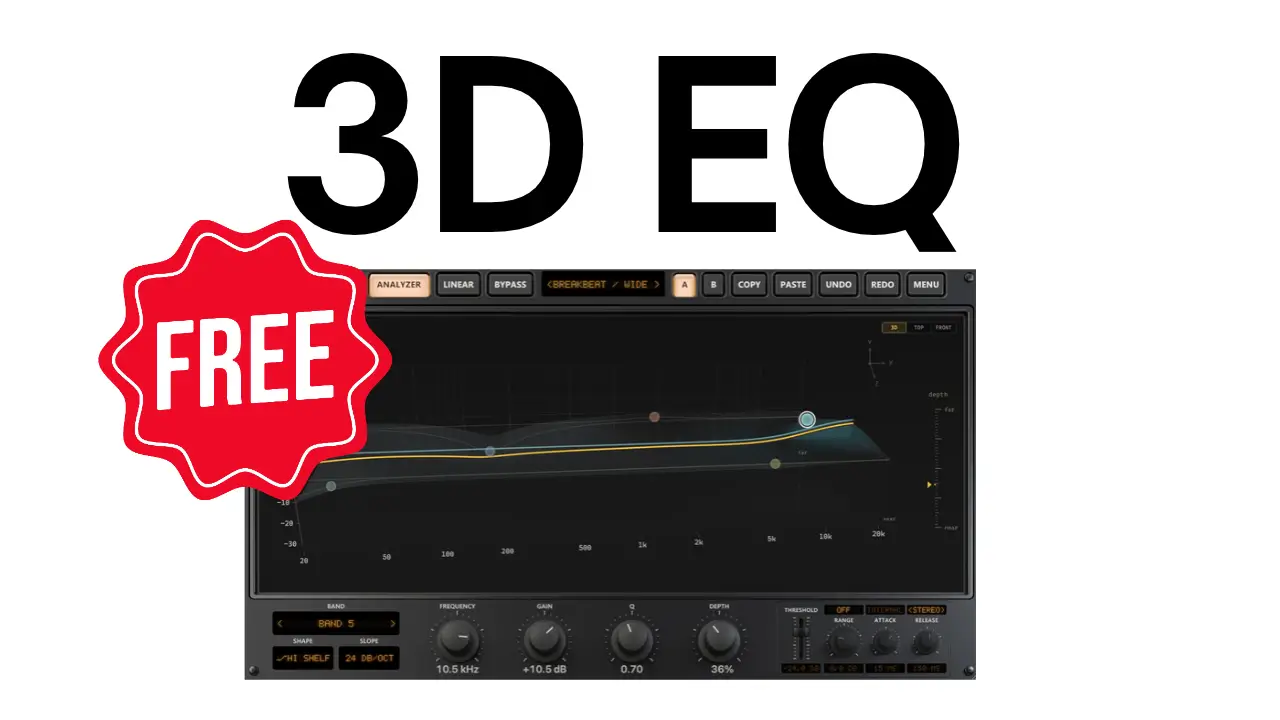
Equalization is usually about adjusting the level of individual frequencies, but what if you could also change their perceived position within a stereo mix?
That’s the idea behind Spatial EQ from RiverFlux Audio, a free 3D equalizer plugin that combines traditional EQ controls with spatial depth, dynamic EQ, and Mid/Side processing.
In this video, I take a closer look at the plugin and test some of its capabilities on vocals and drums.
What Is RiverFlux Audio Spatial EQ?
Spatial EQ takes a different approach to equalization by introducing 3D processing. Along with the usual frequency and gain adjustments, the plugin lets you push different frequency bands backward in the perceived stereo space using its depth controls.
This gives you another way to shape the sound and experiment with how individual frequency ranges sit within a mix.
The plugin is available for Windows, macOS, and Linux.
Seven EQ Filter Shapes
Spatial EQ includes seven different filter shapes:
- Bell
- Low Shelf
- High Shelf
- Low Cut
- High Cut
- Notch
- Band Pass
These provide the traditional equalization tools you’d expect, while the additional spatial controls give you another dimension to work with.
Dynamic EQ on Every Band
Another useful feature is the inclusion of dynamics on every EQ band.
You can configure both upward and downward dynamics and adjust several parameters:
- Threshold
- Range
- Attack
- Release
- External sidechain
This allows you to go beyond static EQ adjustments and have individual frequency bands respond dynamically to the incoming audio.
The plugin also supports Mid/Side processing, providing additional flexibility when working with stereo material.
Testing Spatial EQ on Vocals
For the first demonstration, I load Spatial EQ onto a vocal track and compare the processed signal against the bypassed version.
This is where the depth processing becomes particularly interesting. You can push different frequency bands backward, changing their perceived position while also using the dynamic EQ features.
It’s an interesting alternative to simply boosting or cutting frequencies with a conventional equalizer.
Testing Spatial EQ on Drums
Next, I try the plugin on a drum loop.
The demonstration provides another opportunity to hear how the spatial processing and EQ adjustments affect a different type of audio material.
Between the vocal and drum examples, you can get an idea of the different tone-shaping possibilities available with Spatial EQ.
Final Thoughts
RiverFlux Audio Spatial EQ combines traditional equalization, dynamic processing, Mid/Side functionality, and 3D spatial controls in one free plugin.
The depth feature is the main attraction, offering another way to experiment with frequency placement and the stereo image of a mix.
If you’re interested in trying a different approach to EQ, it’s worth checking out.
Download RiverFlux Audio Spatial EQ
The plugin is available for Windows, macOS, and Linux.
Leave a Reply